Ir al contenido

CONTACT

  • Inicio
    • Piloto
    • Agendar demo
    • Premios y Partners
  • Funciones
  • Tecnología
  • Notícias
Log in
Log in

  • Inicio
    • Piloto
    • Agendar demo
    • Premios y Partners
  • Funciones
  • Tecnología
  • Notícias
Log in
Log in

User Manual V1

17
  • How to register on the platform? V1
  • Initial account setup V1
  • How to invite third parties to your shipment? V1
  • Manage and upload documents in USYNCRO V1
  • Steps to manage your shipments V1
  • Manage your financing project from USYNCRO V1
  • Manage insurance project for your records V1
  • Manage customs pre-clearance from the platform V1
  • USYNCRO Payment Plans V1
  • How to change my password? V1
  • Record activity V1
  • Dashboard of the shipments V1
  • Internal chat of USYNCRO V1
  • Creation of eCMR V1
  • Creation of eBL V1
  • Servicios aduaneros de USYNCRO V1
  • How to apply for your digital identity profile in FIATA? V1

User Manual USYNCRO

23
  • Manage Documents with USYNCRO
  • dsd
  • NEW VERSION 1.16.0
  • Company invitations
  • Pasos para realizar tus expedientes ING
  • How to manage your first shipment?
  • Example draft
  • Example article
  • Glosario de términos
  • Version 1.32
  • Registration on USYNCRO´s platfrom
  • Invite collaborators & add favorites
  • Events & ativity of the shipment
  • Templates Creation
  • Insurances
  • Shipping messaging
  • Views
  • Emision de documentos aduana de Egipto CargoX
  • Initial account setup
  • ¿Cómo darse de alta en la plataforma?
  • Customs Clereance
  • TRANSPORT & GOODS DATA
  • Reference and invoice
View Categories
  • Inicio
  • Documentación
  • User Manual V1
  • Creation of eBL V1

Creation of eBL V1

2 minutos de lectura

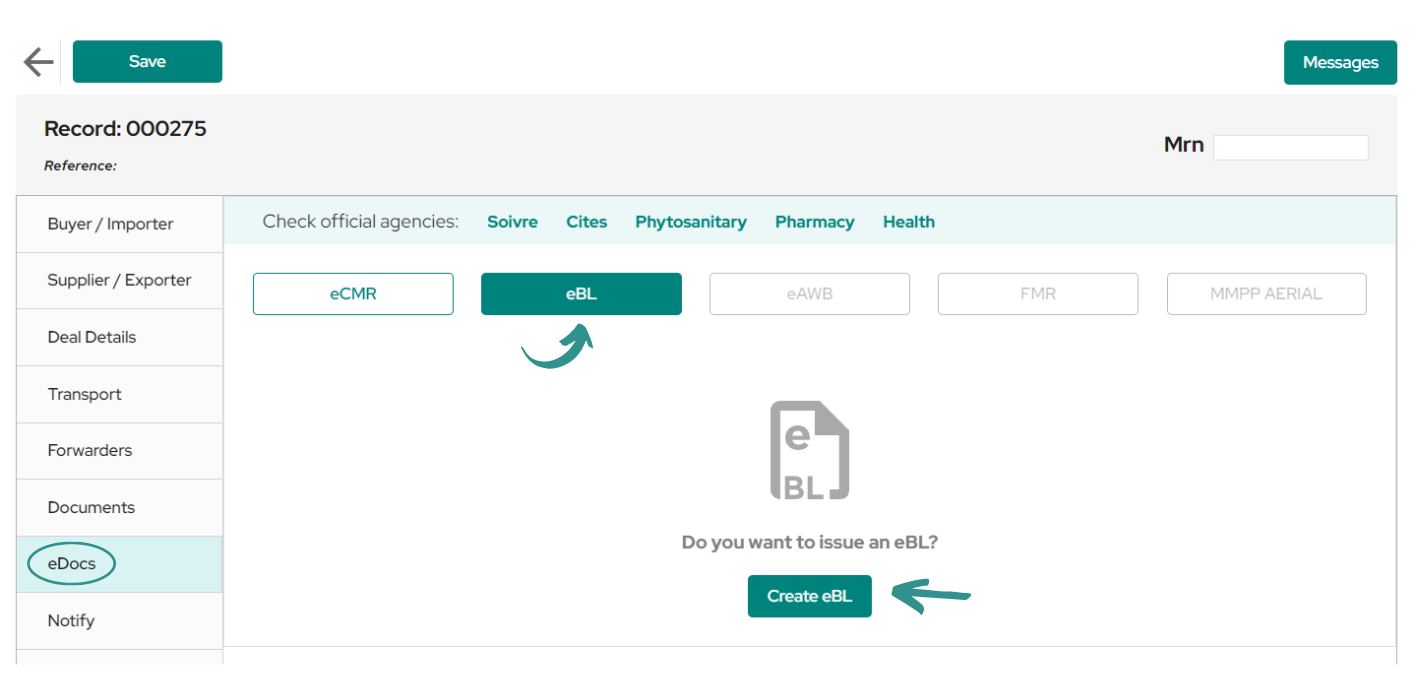
To start creating your eBL, first enter the record of the shipment for which you wish to create the document and then click on the «eDocs» tab.

In this tab you will see a window where you can select which eDoc you want to manage, once selected, click on the «Create eBL» button.

PS: Before creating the document confirm that this shipment already has a H.S. code included in the «Details» section.
Once the document has been created, you will see the following window containing the draft eBL, which will have a title generated for its identification in the list called «Drafts» and then in the «Issued» list. This draft can be deleted by clicking on the trash can icon on the right.
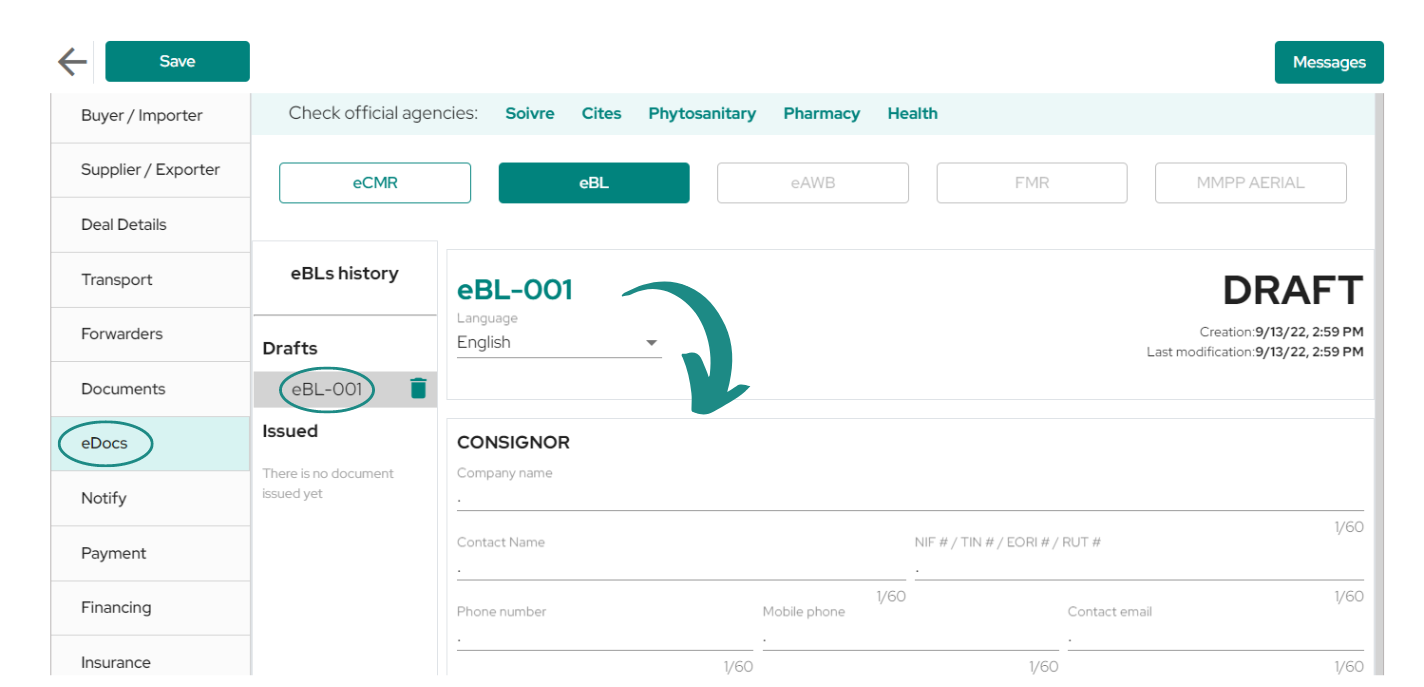
Within the draft document you will find the different fields required for its issuance. The different sections to be filled in are divided into: Consignor, consignee, CTO agent, CTO, CTO, notify, First signatory authentication date, Declared Value For Carriage Amount, Declared value for transport quantity, Insurance value amount, Main Carriage Transport Movement & Applicable service charge.

PS: It is recommended to complete the fields of the shipment before creating eBL, since the data, that is already entered in their corresponding sections, will be copied to the eBL at the time of creation. For example, the «Consignee» data will be copied into the corresponding section of the eBL, as long as it has been entered into the shipment prior to document issuance.

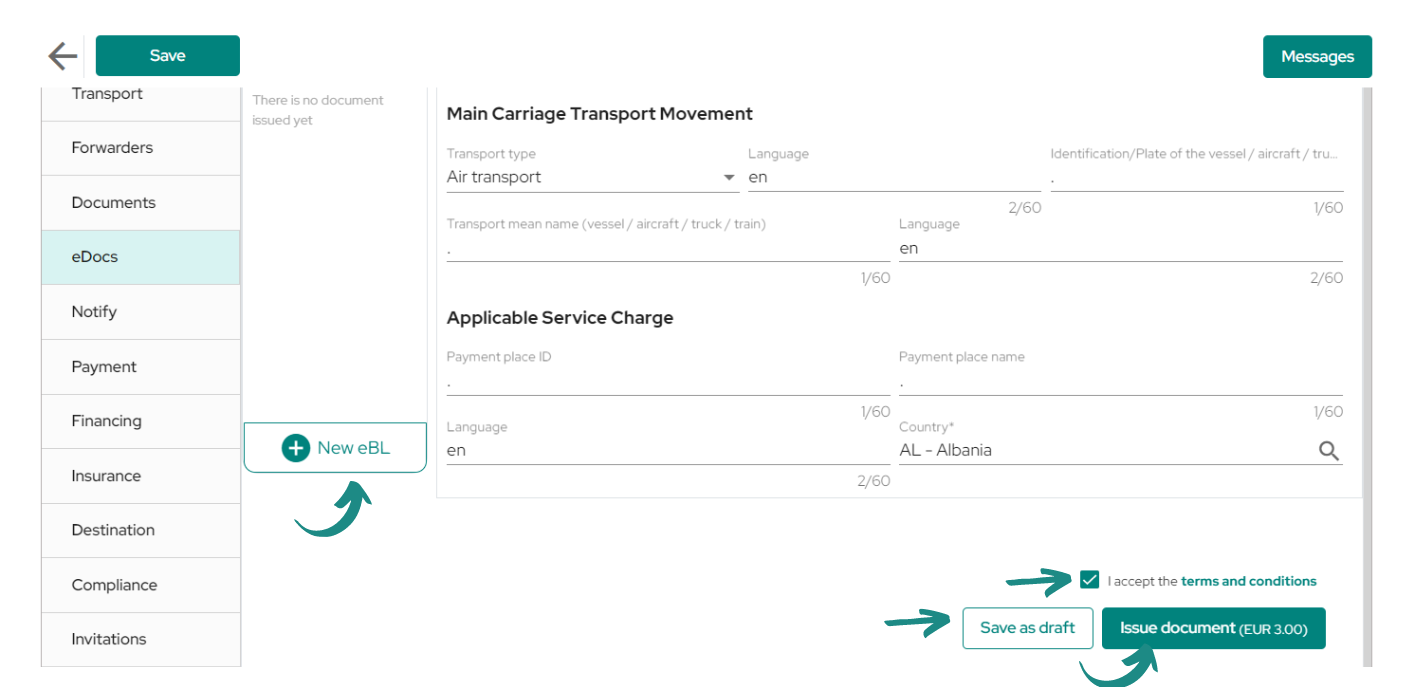
Once you have finished completing all the necessary information for the document, proceed to scroll to the bottom of the draft, where you will find the buttons to preview and save the draft, as well as the button to issue the document.

Make sure you have a payment method entered before issuing the eBL for the action to be valid. You will be able to generate a second eBL by clicking on the «New eBL» button, which will include a second draft in the «Drafts» list.
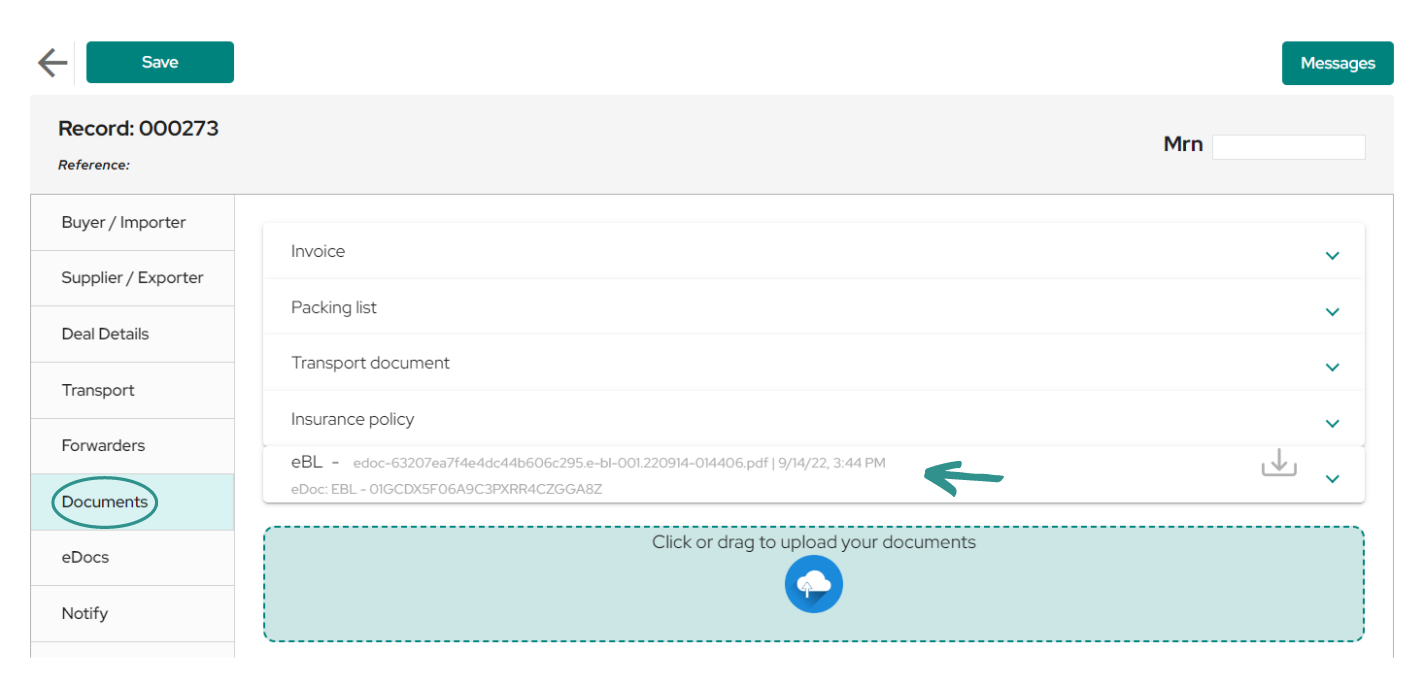
Once the eBL creation process is finished, you can see how in the tab called ‘‘Documents» it is already uploaded as any other document of the operation.
Updated on septiembre 24, 2026

What are your Feelings

  • Happy
  • Normal
  • Sad

Comparte este artículo:

  • Facebook
  • X
  • LinkedIn
  • Pinterest
Creation of eCMR V1Servicios aduaneros de USYNCRO V1

Deja una respuesta Cancelar la respuesta

Tu dirección de correo electrónico no será publicada. Los campos obligatorios están marcados con *

La plataforma SaaS neutral para la orquestación inteligente de la cadena de suministro global y la digitalización aduanera.

Facebook X-twitter Youtube Linkedin
Manuales Usyncro
Sello PYME INNOVADORA 10/09/2029
B88019286
BLOCKCHAIN CUSTOMS TECHNOLOGY SL
PYME INNOVADORA
Válido entre 11/09/2026- 10/09/2029
escudo de MEIC 10/09/2029
Acceso Clientes

Email: info@usyncro.com

Seguridad garantizada con tecnología Blockchain e IPFS


© 2026 USYNCRO. Todos los derechos reservados.

Aviso Legal | Política de Privacidad | Política de Cookies